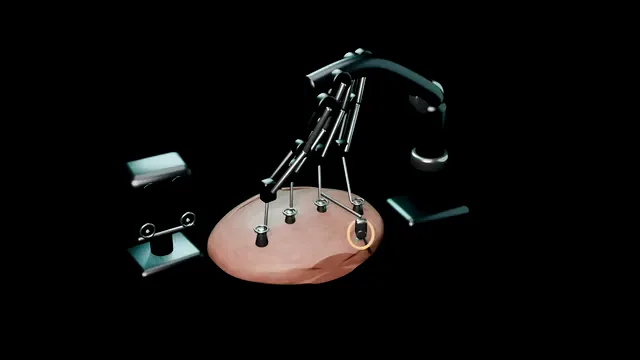
The surgeon sits at a console and drives every move the arms make: a magnified 3D view, instruments that wrist like a hand, and motion that is scaled and tremor-filtered before it reaches tissue.
The trade is paid in touch - the console has none - so vision, docking discipline and a rehearsed emergency undock carry what the hand used to.
Core tierFRCS endourology and laparoscopy, roboticInteractive 3D
The theatre triangle: console, patient cart and the wristed tips inside. Schematic, not to scale; relationships only.
The setup is a triangle with the patient at one corner.
The console sits away from the table, where the surgeon drives a magnified 3D field with scaled, tremor-free motion and no sense of touch.
The cart stands over the patient with three to four articulated arms, each coupled to a port that was placed with the docking geometry in mind.
The wristed tips inside the abdomen are the payload: seven degrees of freedom where a straight laparoscopic stick gives four, which is why deep-corner reconstruction stopped being the robot’s hardest argument.
The geometry to carry is that every arm works along its port axis, every collision was avoidable at docking, and every force the console cannot feel must be read off the tissue as sight: blanching, deformation, the behaviour of the suture.
›Surgeon console - where the operator actually sits: stereo viewer, hand interfaces and the switches that scale and steady every motion before it reaches the patient.
›Patient cart - the column and boom the arms hang from; docked over the target so every arm reaches its port along its working axis.
›Articulated arms - camera and working arms with clearance designed at docking; their arcs decide whether the case flows or the arms collide.
›EndoWrist tips - the pitch and yaw at the instrument head that restore the degrees of freedom straight laparoscopy loses.
›Assistant port - the human hand in the loop: retraction, suction, suture cutting and the reload the platform cannot do for itself.
Why roboticThe robot is not autonomous and it is not a surgeon: it is a remotely driven instrument platform, and every movement originates at the console. What the platform buys is a magnified stereoscopic view down the working instruments, tips that articulate like a wrist inside a closed abdomen, and motion that is scaled down and tremor-filtered before it ever touches tissue. What it costs is force feedback: the fingers at the console feel nothing, so the eyes are promoted to the sense that guards the tissue. where it bites: the console view is compelling enough to feel embodied. It is a screen: the assistant at the table sees things the console cannot, and hears things the robot does not.
DockingThe patient cart rolls in over the target and each arm is coupled to its port along the axis the instrument will actually work in, not merely pointed at it. Docking is geometry done slowly: the camera port sets the view, the working ports are spaced so their arcs do not cross, and clearance between arms decides whether the whole case flows or the arms fight for the same air. Rushed docking cannot be bought back later in the case. where it bites: arms that docked crossed stay crossed: collisions, blind retraction and a camera that loses the field at the critical moment all trace back to the docking plan.
The EndoWristStraight laparoscopy hands you a stick; the robotic tip hands you a wrist. Pitch and yaw at the instrument head restore the degrees of freedom a closed abdomen takes away, so a needle can be driven at the angle the repair wants rather than the angle the incision allows. Deep pelvis, hilum and retroperitoneum stop being negotiations with a rigid shaft. where it bites: the wrist multiplies what the hands send it: an unsteady console move arrives at the tip as a confident-looking wrong move, scaled and steadied on the way in.
Instrument exchangeInstruments swap under vision and along their own axis: the tip is retracted out of the tissue, the arm lifts, the exchange happens under the camera, and the instrument returns to the same field it left. The tip is never swept laterally inside the abdomen, because an instrument you cannot feel takes no responsibility for what its heel grazes on the way past. where it bites: a blind exchange is how bowel, vessel or suture lines leave the field without anyone deciding it: the tip that went out is not the tip that came back.
Fire and stitchOne arm holds, one arm works. Energy fires under vision with the business end and the tissue behind it in the same frame; the needle driver closes around what the scaled motion hands it and drives the suture at the angle the repair asked for. The assistant port retracts, sucks, cuts and re-loads, because the platform has no fourth working hand to spare and the assistant is the third hand the system never replaced. where it bites: energy near the console suture line, or a needle held while the energy is active, cooks tissue the operator can neither feel nor smell. Fire on the field you can see, then put the energy down.
The trade-offsNo haptics: force is judged by how tissue deforms under the tip, by blanching, by the behaviour of the suture - never by feel. Arms collide where docking was rushed. And the emergency undock is a drilled reflex rather than a discussion: instruments out, arms detached, cart rolled clear, surgeon at the table - seconds, not minutes, whenever the patient calls for it. where it bites: treating the robot as indispensable is the last error of a bad case: the arms come off and the operation continues with hands and a table, exactly as it did before.
The spatial relationships the animation is built to make automatic. Before you read each one, ask yourself: at this point in the operation, what is about to go wrong, and what is my first move? The save for each sits in the Complications tab.
RiskThe docking plan - port lines and arm clearance are decided before the cart rolls in; a rushed dock converts every later step into an argument with the hardware.
RiskVision in place of touch - the console has no force feedback: crushing, tearing and over-tension arrive only as images, and the operator who waits to feel them waits forever.
RiskThe undock path - the route from console to table, arms to detached, cart to clear, is rehearsed before the case needs it, because the one time it is needed it is needed in seconds.
When the case turns: the problem, then the next move.
ActionArms crowd or collide - lift every instrument out, re-plan which arm works which port, and redock the offending arm along its own axis rather than nudging it.
ActionInstrument will not reach the target - the port was placed for a different geometry: externalise, re-incise along the planned line or change instrument length. Do not fight the reach.
ActionSuture tension cannot be judged - there is no feel: read the tissue blanch and the suture cut-through, ease to apposition, and re-check after the first reperfused minute.
ActionConsole lost the view - smudge, fog or bleeding has taken the optics: withdraw the scope along its axis, clear under vision, and clean the port window before advancing again.
ActionThe patient distresses docked - the emergency undock drill: instruments out, arms detached, cart rolled clear, surgeon at the table. Seconds, not minutes.
The examiner stems this scene prepares you for. Try to answer out loud first, then reveal, and learn the discriminator, the detail that turns a pass into a strong pass.
QTalk me through what the robot actually adds over straight laparoscopy, and what it takes away.reveal answer
It adds three things and takes away one.
Added: a magnified stereoscopic view, so the operating field is seen at high magnification in three dimensions;
wristed instruments, whose tips pitch and yaw to restore the degrees of freedom a straight shaft loses once the abdomen is closed;
and scaled, tremor-filtered motion, so the movement at the console arrives smaller and steadier at the tip.
Taken away: haptics.
The console surgeon feels no force, so tension and tissue handling must be read visually, from blanching, deformation and the behaviour of the suture.
The surgeon remains entirely in control throughout; the platform is not autonomous and the move from open conversion remains a live option in every case.
Strong pass
Say all three
Saying plainly that the platform is not autonomous
Naming the loss of haptics as the operative trade
With the visual substitutes that replace it
Examiner note
Saying plainly that the platform is not autonomous and naming the loss of haptics as the operative trade, with the visual substitutes that replace it.
QA colleague docks the robot quickly and the arms are crowding by mid-case. What went wrong and what do you do now?reveal answer
The docking geometry was wrong before the first instrument went in: ports and arms were aligned to the skin rather than to the working axes of the target, so the arcs of the instruments cross as they deepen.
Now: stop and lift every instrument out of the tissue, separate the arms externally, and re-plan which arm works through which port.
Redock the offending arm along its corrected axis rather than nudging it and hoping.
If crowding persists, change instrument lengths or swap a port to a position that was planned for it, and carry the lesson back to the port-placement template for the next case.
Strong pass
Say all three
Naming the root cause as port placement
Docking geometry decided before the cart rolls in
Not as a mid-case instrument problem
Examiner note
Naming the root cause as port placement and docking geometry decided before the cart rolls in, not as a mid-case instrument problem.
QMid-procedure the patient becomes unstable with the robot docked. Walk me through your next two minutes.reveal answer
The drill runs and everyone knows their line.
The console surgeon declares the undock and leaves for the table.
Instruments are withdrawn out of the tissue along their own axes, nothing sweeps as it leaves.
The arms are detached from the ports in the rehearsed order, the ports remain with the patient, and the cart is rolled out along the path planned at setup.
Resuscitation and the operation continue laparoscopically or open while the console side clears.
Afterwards the team debriefs the trigger and the seconds-to-table, because the value of the drill is that it was never rehearsed for the first time in earnest.
Strong pass
The sequence is instruments out, arms detached, cart clear, surgeon at the table, and it runs in seconds because it was rehearsed.
Say it aloud, then reveal. Reading is not remembering.
01The relationshipSay the critical spatial relationship out loud, then reveal.reveal
Memory frame
The setup is a triangle with the patient at one corner.
Why?
The console sits away from the table, where the surgeon drives a magnified 3D field with scaled, tremor-free motion and no sense of touch. The cart stands over the patient with three to four articulated arms, each coupled to a port that was placed with the docking geometry in mind. The wristed tips inside the abdomen are the payload: seven degrees of freedom where a straight laparoscopic stick gives four, which is why deep-corner reconstruction stopped being the robot’s hardest argument. The geometry to carry is that every arm works along its port axis, every collision was avoidable at docking, and every force the console cannot feel must be read off the tissue as sight: blanching, deformation, the behaviour of the suture.
02The first moveArm collision. Your first move?reveal
First move
Stop and lift: every instrument out of the tissue before any arm is moved.
03The escalation triggerArm collision. What makes you call for help?reveal
Escalate when
A field that cannot be recovered → undock the arm, continue laparoscopically or open, and re-plan the docking for the next case.
04The discriminatorWhat turns a pass into a strong pass?reveal
Strong pass
Say all three
Saying plainly that the platform is not autonomous
Naming the loss of haptics as the operative trade
With the visual substitutes that replace it
Examiner note
Saying plainly that the platform is not autonomous and naming the loss of haptics as the operative trade, with the visual substitutes that replace it.
05The pitfallWhere does this operation bite first?reveal
Pitfall
The docking plan
Why?
port lines and arm clearance are decided before the cart rolls in; a rushed dock converts every later step into an argument with the hardware.
Revision practice with self-marked answers, not an assessment of clinical competence. Kept in
this browser only; it does not sync between devices.